
The Script Tag page allows Glance administrators to modify attributes to create a custom script tag that enables Cobrowse on websites. This interface lets users fill out each individual attribute for the script tag and then generate a script that can be copied and pasted into their website.
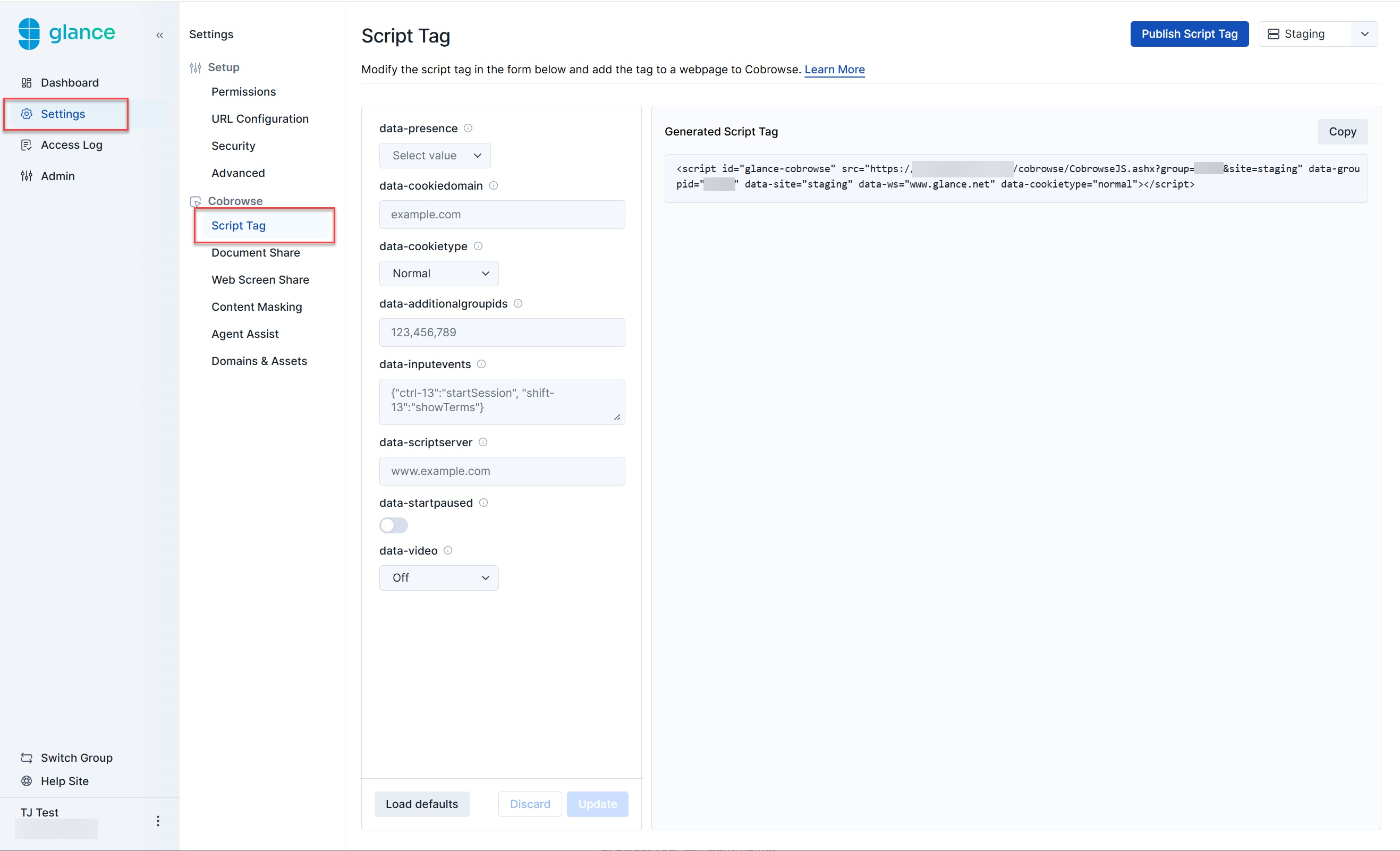
The following attributes can be found within the script tag.
Read-only Tag
Read-only attributes are generated based on previous selections made by the user. The following attributes are generated within the script as read only:
- script id - The identifier used for this script, defaults to
glance-cobrowse. - src - The source of the cobrowse loader script.
- data-groupid - Your assigned Group ID number provided by Glance.
- data-site - The environment (staging or production) that this tag will be deployed to. Select Staging or Production from the drop-down menu to identify what needs to be generated for this script.
- data-ws - The webserver being used (e.g.,
www.glance.net). When implementing the script tag on your website, this can be changed for use in beta or a customer-specific environment.
Script Tag Versions: Staging and Production
There are two versions of the script tag: one for your staging website, and one for your production website. Which profile of Cobrowse is used on your site is specified by the site attribute in the script tag. You should use Staging for your own internal staging environment and Production for your live site.
file:// protocol. If you are trying out Cobrowse on a local website, please access it via a host name added to your local hosts file or equivalent. Basic
data-presence
- Definition: Determines if the presence scripts are loaded and when the connection is made to the presence server. Omit this attribute if you are not using presence.
- Default:
on - Options:
on,off,apionwill load the presence scripts and automatically connect to the presence server if a visitor id is defined in thedata-visitoridscript tag attribute.offwill not load presence scripts.apiwill load the presence scripts, but it is the customer's responsibility to manage the connection and other aspects of the interaction. See the Presence Visitor API.
data-cookiedomain
- Definition: The domain to use for the Cobrowse session cookie. This setting is typically required only for staging sites hosted on a public suffix domain such as
azurewebsites.netorherokuapp.com. Specify the full host name as the cookie domain. For example, if your staging site isabcco.azurewebsites.com, specifydata-cookiedomain="abcco.azurewebsites.com" - Default: N/A
- Options: Hostname of page to be Cobrowsed
data-cookietype
- Definition: The type of cookie to use for the Cobrowse session.
- Default:
normal - Options:
normal,secure,ls,dualnormal(default): A non-secure cookie on your website domain. Use this value if visitors need to be able to navigate to insecure pages during a Cobrowse session.secure: A secure cookie on your website domain. You may use this value if visitors will only need to be able to navigate to secure pages during a Cobrowse session.ls: Local storage on your website domain. You may use this value if you would like to avoid adding a cookie to your domain, and if your visitors only navigate to pages on the same local domain.dual: Both local storage and a cookie are used. Use this value if you have existing code which may delete cookies on your website domain, including the Cobrowse session cookie.
Advanced
data-additionalgroupids
- Definition: Specify additional Group IDs in the script tag, for example:
data-additionalgroupids="59923,50920". It is possible for you to tag different pages with different sets of group ids, but a primary Group ID (data-groupid) must be specified and it is used as a default. - Default: N/A
- Options: Comma separated list of Group IDs
data-inputevents
- Definition: Maps input events to Glance Cobrowse actions. The
data-inputeventsformat is{ "[modifier]-[keycode]" : "[Glance action]", ...}. Example:HTMLdata-inputevents='{"ctrl-13":"startSession", "shift-13":"showTerms"}' - Default: N/A
- Options: The key code can be any standard JavaScript key code mapped to Cobrowse actions.
data-scriptserver
- Definition: If you are hosting the script on your own server, add this attribute to tell Glance where to find the additional script and CSS resources that you host.
- Default: N/A
- Options:
[servername]
data-startpaused
- Definition: Allows you to start the session in a paused state. Enabling sets
data-startpaused="1". - Default:
off - Options:
on,offonstarts the session in a paused state.offstarts the session in an unpaused state.
data-video
- Definition: Starting video size.
- Default: N/A
- Options:
small,large,off