
Provision users with Glance single sign-on through the configuration screen. The best way to obtain values for most fields in this screen is to upload a Metadata XML file, which most identity provider operators can provide.
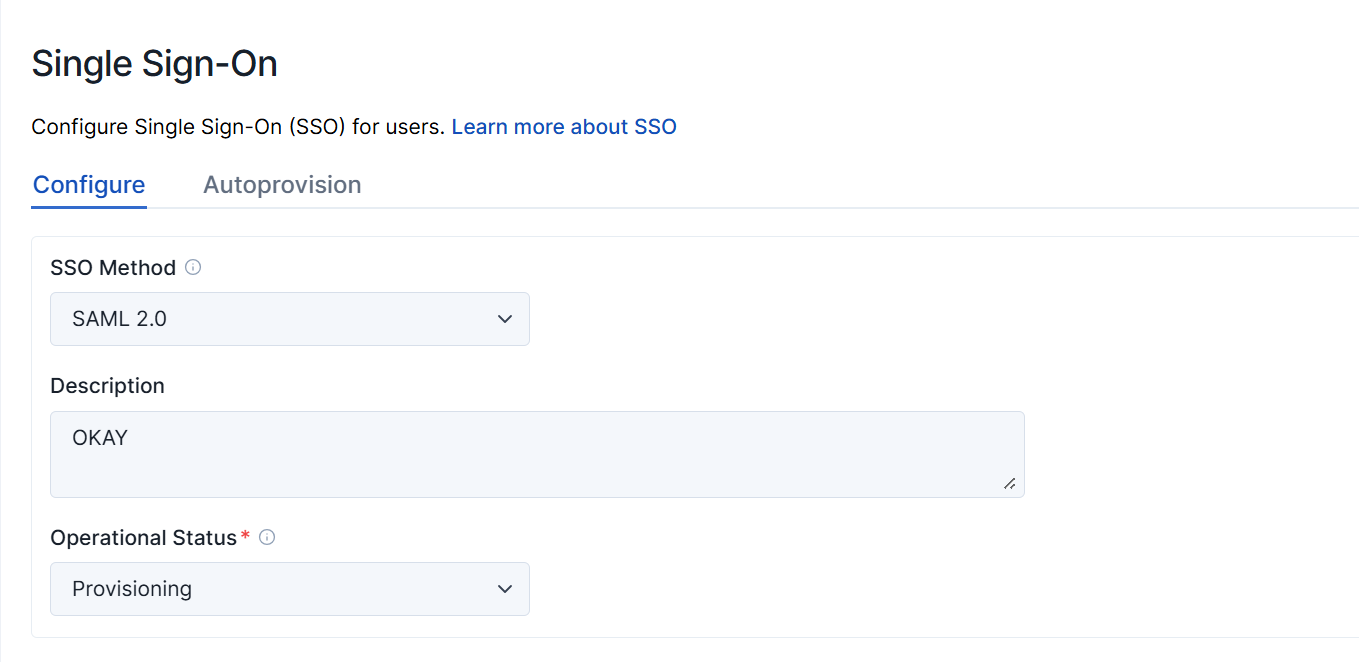
| Field | Description |
|---|---|
| SSO Method | Sets the SSO protocol. Options include Off, SAML 2.0, or Encrypted SAML 2.0. Most SAML customers use standard SAML 2.0 (without encryption). |
| Description | Provides a custom text description of your SAML setup. |
| Operational Status | Sets the deployment state. When first provisioning an account, set this to Provisioning to log SAML authentication attempts in the Access Log. Once stable, change this to Production. |
Identity Provider Configuration
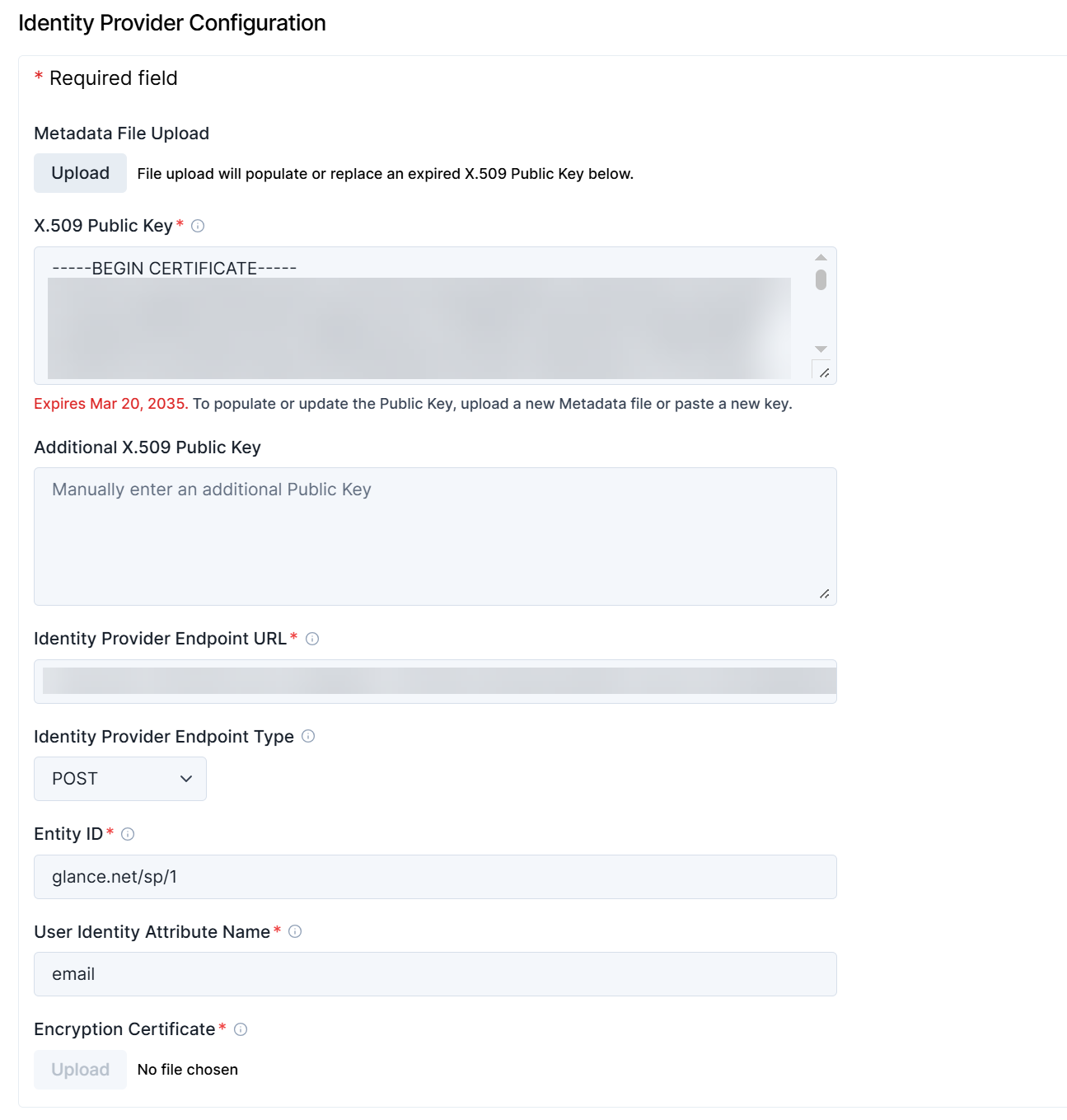
| Field | Description |
|---|---|
| Metadata File Upload | Uploads an XML document furnished by the identity provider. Metadata Discovery Endpoints automatically populate most of the required fields on this provisioning page. |
| X.509 Public Key | Validates Assertions (tokens sent to Glance) using the public key furnished by your identity provider. The identity provider cryptographically signs Assertions with a matching private key to prevent forgery. |
| Additional X.509 Public Key | Stores an additional public key certificate if your identity provider has supplied one (useful during key rotation). |
| Identity Provider Endpoint URL | Determines the URL where Glance presents authentication requests. A Metadata Discovery Endpoint document contains this value. |
| Identity Provider Endpoint Type | Defines how Glance presents authentication requests to your identity provider (using either an HTTPS redirect or an HTTPS POST operation). |
| Entity ID | Sets the federation entity ID (or relying party trust identifier) for the Glance service provider. In most cases, this should be set to glance.net/sp/1. |
| User Identity Attribute Name | Specifies the name of the attribute uniquely identifying the user within the Assertion token. The attribute value must uniquely match the user's Glance Address, Partner User ID, or Email Address. |
| Encryption Certificate | Displays when Encrypted SAML 2.0 is selected. This is the key certificate Glance uses to decrypt Assertion documents. A Glance staff member will upload the key certificate file and update the portal, providing you with the corresponding public key to share with your identity provider operator. Note: Encrypted SAML provides an extra measure of security beyond HTTPS. However, most SAML users rely on HTTPS alone rather than using encryption. |
Optional Configuration
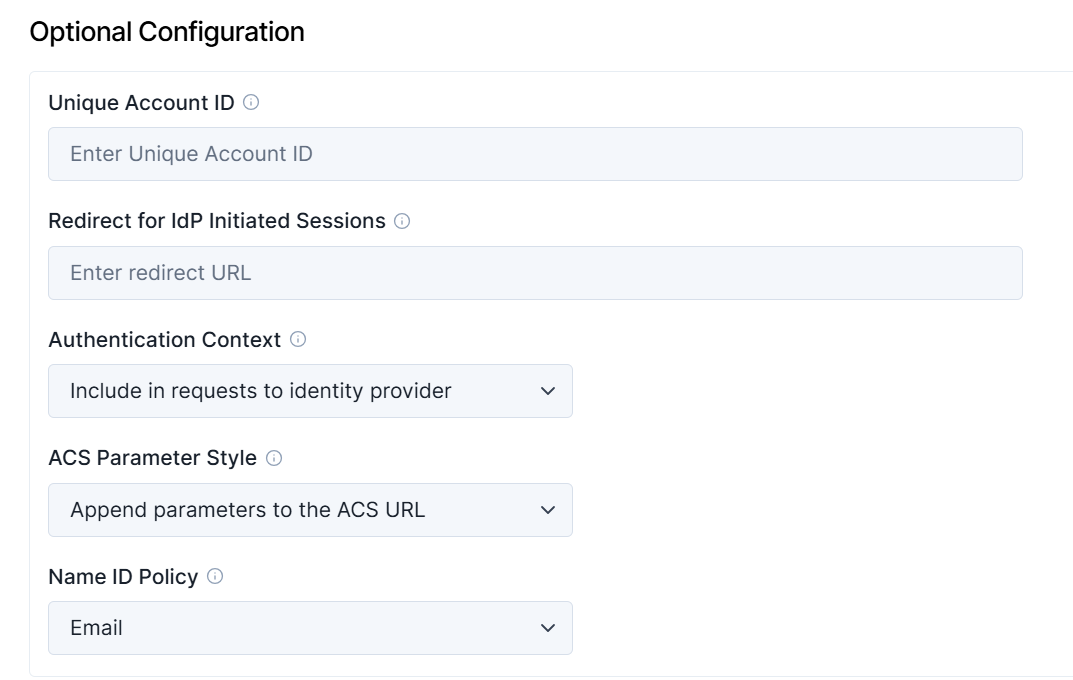
| Field | Description |
|---|---|
| Unique Account ID | Requires a specific value for certain identity providers. For Salesforce accounts, use the Organization ID. For Entra accounts, use the Tenant Unique Name. If set, you can use its value in the idptoken parameter in Service Target URLs. Leave blank if not required. |
| Redirect for IdP-initiated sessions | Redirects users who initiate single sign-on directly from the identity provider's UI to an appropriate page on the Glance service (e.g., /agentjoin/agentjoin.aspx presents the Cobrowse join page). This must be a relative URL, not an absolute URL starting with https://. |
| Authentication Context | Defines specific authentication contexts required (or disallowed) by your identity provider when Glance sends single sign-on requests. |
| ACS Parameter Style | Configures how your identity provider responds to single sign-on requests using a Glance URL called an Assertion Consumer Service (ACS). Parameters are usually appended to the ACS, but some providers pass them in a separate Relay State element. |
| Name ID Policy | Sets the NameID Policy required by your identity provider when Glance sends an SSO request. In most cases, this should specify Email, though some providers require Unspecified. |
Changing Public Keys
Glance supports multiple public keys. Each one is used in turn to attempt to validate each SAML Assertion.
From time to time, identity provider operators may replace (rotate) the cryptographic key they use to sign SAML assertions. These steps allow key-pair changes without the need to actively synchronize downtime between your identity provider and Glance:
- The identity provider operator generates a new public/private key pair.
- Glance puts the new public key into the provisioning screen as an Additional X.509 Public Key.
- The identity provider operator starts using the new key pair.